Blog
Zapier vs Make vs n8n: Which Automation Tool Should You Learn First?
A clear comparison of Zapier, Make, and n8n — what each tool is built for, who should start with which, and how to choose the right first automation tool.
Quick answer
For most beginners, learn Zapier first — it has the largest app ecosystem, the most beginner-friendly onboarding, and the shortest path from idea to live workflow. Learn Make second if you want more visual, systems-style automation. Learn n8n first if you are already technical and want deeper control or self-hosting.
What Zapier, Make, and n8n Are Really Built For
They all help you connect apps, move data, and automate repetitive work — but they are not the same kind of tool.
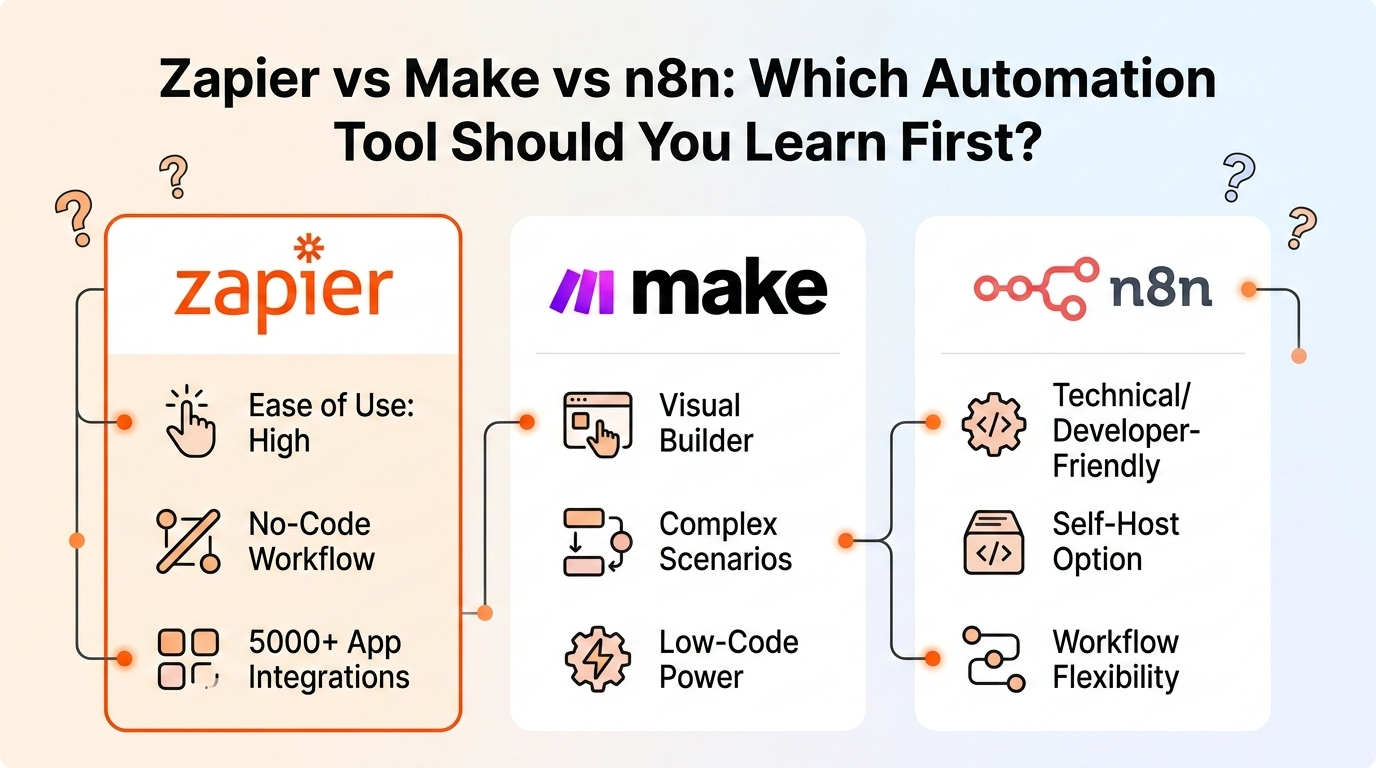
Zapier is built around fast, no-code automation across a very large app ecosystem. It now also pushes heavily into AI workflows, agents, and chatbots. Best understood as the "fastest start" option.
Make positions itself as a visual-first automation platform with 3,000+ pre-built apps, AI assistance, and flexible custom API connections. Best understood as the "visual systems" option.
n8n is aimed at technical teams, combining drag-and-drop workflows with code-level flexibility, cloud hosting, and self-hosting options. Best understood as the "technical flexibility" option.
For most beginners, the best first tool is Zapier. For visual learners, Make is often the better second step. For technical users who want deeper control, n8n is the strongest long-term option.
If You Are a Complete Beginner, Learn Zapier First
For most people starting from zero, Zapier is the best first tool to learn. It is centered on no-code automation, has one of the largest integration ecosystems (8,000+ apps), and gives beginners a very direct path from "I want to automate this task" to "my workflow is live."
If your goal is to automate lead forms, CRM updates, Slack alerts, and follow-ups this week, Zapier is usually the cleanest way to begin.
Zapier's beginner-oriented onboarding, no-code positioning, and breadth of app library make it the strongest starting point for most new automation learners.
- Founders, marketers, and operators who want practical business automation fast.
- Sales teams managing lead flow across multiple tools.
- Solo business owners who do not want to write code.
- Anyone whose priority is speed over depth of control.
If You Think Visually, Make May Feel Better Than Zapier
Some people do not learn best from simple linear builders. They learn best when they can see the whole workflow on one canvas.
Make's product is strongly built around a visual drag-and-drop builder. In practice, that makes Make feel more like designing a visible system than just connecting triggers and actions.
Make is often better as the second tool you learn — once basic automation logic already makes sense — rather than the very first.
- You like seeing the entire flow on one canvas.
- You want to understand how data moves through each step.
- You prefer designing more branched or conditional workflows.
- You enjoy debugging by inspecting the scenario visually.
If You Are Technical or Want Self-Hosting, Learn n8n First
n8n becomes the best first choice when you are already somewhat technical. Its docs and homepage make this clear: n8n is positioned for technical teams, supports cloud and self-hosting, is fair-code licensed, and self-hosting is recommended for expert users who understand servers, scaling, security, and configuration.
If your brain naturally goes toward APIs, custom nodes, and infrastructure control, n8n may be the right starting point even if it is not the easiest tool overall.
- Developers and technical founders.
- Engineering-heavy startups.
- Teams that want more control over infrastructure.
- People who expect to use custom logic, APIs, or code often.
- Builders who care about self-hosting or privacy-oriented deployment.
Integration Ecosystem: Zapier Leads, Make Is Strong, n8n Is Flexible
Zapier currently promotes 8,000+ integrations. Make promotes 3,000+ verified apps plus custom API-based connections. n8n focuses less on marketplace size and more on flexibility: connecting apps with APIs, building custom nodes, and using code when needed.
- Zapier — best chance your everyday SaaS stack is already connected out of the box.
- Make — strong pre-built catalog plus visual builder and API flexibility.
- n8n — most flexible if you are comfortable filling gaps with technical work.
Pricing Mindset Is Very Different Across the Three Tools
A lot of beginners compare only monthly price, but the real difference is how usage is counted — and that shapes how you design workflows.
Each pricing model trains you to think about automation differently — in tasks, in module runs, or in completed executions. That changes how you design workflows, not just what you pay.
- Zapier prices around tasks. Free plan includes 100 tasks/month. Paid plans offer pay-per-task billing when you hit your limit.
- Make prices around credits, where each module action in a scenario counts as one credit. Free plan has no time limit.
- n8n prices cloud plans around workflow executions, not complexity. Starter plan includes 2.5K executions with unlimited steps, users, and integrations.
AI Workflows: All Three Matter, But in Different Ways
All three tools now push AI capabilities, but the angle is different for each.
Want AI with the easiest business automation path? Zapier. Want AI in a visual orchestration environment? Make. Want AI with more technical control and self-hosting? n8n.
- Zapier — leans hardest into broad AI orchestration: AI workflows, agents, chatbots, MCP, and connections between 400+ AI tools and nearly 8,000 apps.
- Make — emphasizes visual-first AI automation, agentic workflows, and AI assistance (Maia) for building and troubleshooting scenarios.
- n8n — frames AI through technical flexibility: AI workflow building, self-hosted AI starter kits, and combining AI with deeper business process automation.
Which Tool Is Easiest to Learn?
The ranking depends on who you are, not just which tool is "simpler."
This ranking follows from official positioning: Zapier is beginner-oriented and no-code-first, Make is visual-first and systems-oriented, n8n is explicitly for technical teams and expert self-hosting scenarios.
- For most non-technical beginners: Zapier → Make → n8n.
- For visual thinkers who do not mind more complexity: Make → Zapier → n8n.
- For technical builders: n8n → Make → Zapier.
So Which Automation Tool Should You Learn First?
Here is the clearest answer based on where you are starting from.
- Learn Zapier first if you are a beginner, want to automate business tasks quickly, care more about speed than deep control, and use many mainstream SaaS apps.
- Learn Make first if you are already comfortable with basic automation logic, learn visually, and want to design and inspect more complex scenarios.
- Learn n8n first if you are technical, expect to work with APIs or custom logic, want self-hosting options, and care about infrastructure control and flexibility.
The Recommended Learning Order for Most Beginners
Start with Zapier. It is the easiest first win.
Then, once you understand triggers, actions, filters, mapping, and workflow design, move to Make if you want more visual orchestration.
Move to n8n when your automation needs become more technical, customizable, or infrastructure-aware.
That learning order gives beginners fast momentum without locking them into one mental model forever.
The best automation tool to learn first is not the one with the most hype. It is the one that matches your current stage.
Final Thoughts
Zapier, Make, and n8n all solve real automation problems — but they are built for different users at different stages.
If you are starting from zero, learn the tool that helps you build useful workflows fastest. That is usually Zapier. If you already understand the basics and want more visual control, Make is a strong next step. If you want power, flexibility, and self-hosted possibilities, n8n becomes the better long-term play.
The smartest path for most people is not choosing one tool forever. It is learning automation in the right order.
Want a personalized roadmap for learning Zapier, Make, or n8n with theory, quiz questions, and hands-on practice tasks? Generate your custom automation learning plan on Kavka and start building real workflows instead of just reading about them.
Build your personal plan
Ready to practice Zapier?
Get a step-by-step learning route tailored to your level — with quizzes and hands-on tasks, not just theory.